Features
The application cycles through images in sequential order, advancing to the next wallpaper each time the configured interval elapses. When the end of the sequence is reached, it wraps back to the first image. The current position in the sequence is persisted to a state file, so if the application is restarted, it resumes from where it left off rather than starting over.
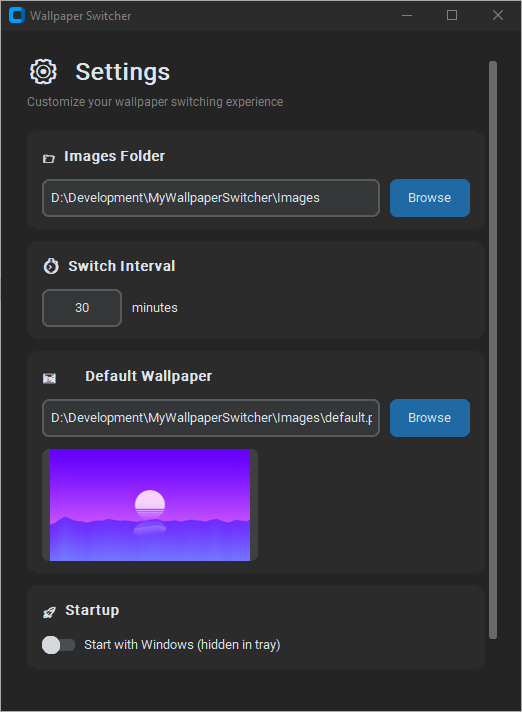
A modern dark-themed settings interface lets users specify the images folder, the switch interval in minutes, and the default wallpaper used when switching is disabled. The default wallpaper preview is shown in the settings window. The settings window can be hidden to the system tray, and the application continues running in the background. From the tray icon, users can enable or disable wallpaper cycling, open the settings window, or exit the application. The tray menu reflects the current enabled or disabled state with checkmarks.
Windows autostart is supported. When enabled, the application is registered in the Windows Run registry key and launches at login. When started via autostart, it launches directly into the tray without showing the settings window. Users can run the application in this hidden mode manually using the --hidden command-line flag.
Tech Stack
The application is written in Python and targets Windows. It uses CustomTkinter for the settings GUI, which provides a modern dark-themed look with rounded corners and a card-based layout. PyStray powers the system tray icon and context menu. Pillow (PIL) is used for image handling, including the tray icon generation and the default wallpaper preview in the settings window.
Wallpaper changes are applied via the Windows API using ctypes. The application calls SystemParametersInfoW with SPI_SETDESKWALLPAPER to set the desktop background. Autostart is implemented through the Windows Registry, using winreg to read and write the HKEY_CURRENT_USER\Software\Microsoft\Windows\CurrentVersion\Run key.
Configuration is stored in JSON. The main config file holds the images folder path, switch interval, and default wallpaper filename. A separate state file stores the current index in the wallpaper sequence for persistence across restarts. The project is packaged into a single executable using PyInstaller with the windowed option so no console window appears.